
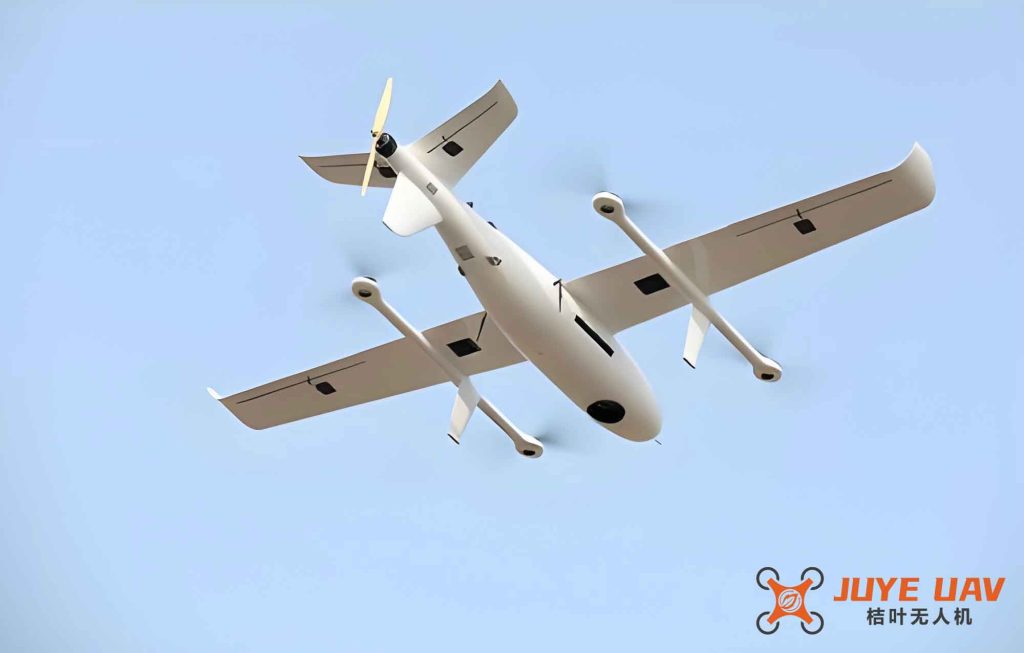
In recent years, fixed-wing drones have been widely adopted across various industries due to their low cost, flexibility, low risk, and ease of operation. Their application in surveying and mapping has become particularly prominent. A typical electric fixed-wing drone with a 2.5-hour endurance and a cruising speed of 80 km/h can cover an area of 20 km² in a single flight, making it exceptionally valuable for emergency response after natural disasters such as earthquakes and floods. The aerodynamic efficiency of fixed-wing drones enables long endurance and wide operational range, which is especially advantageous in large-scale monitoring tasks like forest fire prevention, as well as long-distance inspection of power lines and oil pipelines in remote areas.
In my work I have extensively used the UV20 fixed-wing UAV system, which is a fully autonomous GPS-navigated aerial vehicle. The system is powered by an electric motor with a flight endurance of 1 hour and 30 minutes. It carries a mission payload—typically a Canon 5D Mark III digital camera—to acquire remote sensing data with high precision and full automation. The takeoff and recovery mechanisms are catapult launch and parachute landing, with the entire process controlled automatically by the flight computer.
1. System Composition of the UV20 Fixed-wing Drone
The UV20 fixed-wing drone system consists of six major subsystems: the airframe, flight control system, data link system, ground station system, mission payload system, and catapult launcher system.
| Subsystem | Components | Function |
|---|---|---|
| Airframe | Fuselage, wings, tail, propulsion unit, flight control surfaces, power supply | Provides structural support, aerodynamic lift, and propulsion |
| Flight Control System (Autopilot) | Micropilot MP2028 autopilot | Controls navigation, autonomous takeoff, climb, cruise, descent, and recovery |
| Data Link System | Radio transmitter/receiver, antenna | Enables real-time data communication between ground station and UAV |
| Ground Station System | Portable computer, ground control software, data communication unit | Mission planning, flight monitoring, payload control, and data logging |
| Mission Payload | Canon 5D Mark III with 35 mm fixed lens | Acquires high-resolution aerial imagery |
| Catapult Launcher | Three-section folding rail (3 m total), rubber ropes, winch, pulling cart, tension gauge | Provides initial acceleration for safe takeoff |
The ground station software interface includes three functional zones: a map display area, a control area, and a real-time telemetry area. The map area shows the base map, flight plan, flight trajectory, aircraft position, attitude, altitude, and other information. The control area manages flight commands and payload functions such as camera trigger, emergency return, and mission cancellation. The telemetry area continuously monitors the current position, altitude, attitude, airspeed, ground speed, camera exposure points, flight time, and battery status.
2. Minimum Operational Conditions for the UV20 Fixed-wing Drone
Through repeated flight tests and extensive practical experience, I have established a set of minimum environmental and site conditions required for safe and effective operation of this fixed-wing drone system.
2.1 Requirements for the Takeoff and Landing Site
2.1.1 Terrain and Obstacles
Since the UV20 uses a catapult for launch and a parachute for landing, it requires a clear and flat area. During takeoff, the drone glides at low altitude, while during landing, it drifts under the parachute. Analysis of numerous flights led to the following criteria:
- Terrain must be flat.
- No obstacles (flagpoles, power lines, trees, etc.) within 1000 m in the launch direction and 500 m laterally.
2.1.2 Wind Speed and Direction
Wind significantly affects both catapult launch and parachute descent. The takeoff/landing site should be on the windward side of a slope. Avoid leeward slopes and valleys where turbulence and unstable wind conditions can occur. During parachute descent, wind at ground level may differ from that aloft, making it difficult to predict the landing point accurately.
2.1.3 Ground Station Radio Link
The ground data link must maintain a clear line-of-sight between the ground station antenna and the drone. Therefore, no large buildings or mountains should block the path between the site and the mission area. Furthermore, the radio range is approximately 30 km, so the distance from the site to the mission area should not exceed this value.
2.2 Weather Constraints
Rain and thunderstorms are prohibited because many electronic components of the UV20 are not waterproof. Wind speed must be less than 8 m/s; beyond this threshold, the drone’s airspeed relative to the wind may drop below the minimum required to maintain controlled flight. The maximum distance from the takeoff site to the mission area is 30 km due to radio link limitations.
3. Image Acquisition and Processing
The complete workflow for aerial image acquisition using the fixed-wing drone system is divided into four major phases: pre-flight preparation, flight execution, data analysis and quality check, and final product generation. The following sections describe each step in detail, using a real flight test as an example.
3.1 Pre-Flight Preparation
Before any mission, I ensure that all system components are ready. The following procedures are carried out:
| Item | Action | Remarks |
|---|---|---|
| Flight battery (LiPo) | Charge to 25 V or above; use 2–3 A normal charge; 5 A only in emergencies | Do not frequently use high current to preserve battery life |
| Ground station computer | Check for system stability, no blue screens, no slow response, no malware; ensure sufficient battery | Any malfunctioning computer must be replaced |
| Catapult battery (12 V) | Charge the lead-acid battery that powers the winch | Ensure enough energy for multiple launches |
| Catapult hardware | Inspect rail for deformation, rubber ropes for wear, trigger mechanism for correct operation | Replace damaged parts |
| Map cache & mission plan | Open ground station software, locate mission area, download map cache (up to zoom level 15), define area polygon, plan flight lines | Prepare 2–3 alternative takeoff sites within 30 km range |
3.2 Flight Execution
3.2.1 Launch Point and Direction
Based on geographic conditions and wind, I select a launch point at the downwind end of the site, aiming the catapult into the wind or along the longer side of the field. In the example, the launch direction was northeast.
3.2.2 Catapult Assembly and Test
Assemble the three-section folding rail, lock all bolts, align the rail with the launch direction, and anchor the rear foot with stakes to prevent recoil. Adjust the front foot to give an appropriate launch angle. Ensure the rail is level both front and rear. Perform a test launch using a dummy mass (iron bird) with a tension of 210 N; the dummy should travel more than 20 m to confirm correct performance.
3.2.3 Aircraft Assembly
Install wings, tail, propulsion battery, recovery system (parachute and airbags), and the camera payload. Then place the assembled drone onto the catapult cart and lock it.
3.2.4 Ground Station Setup
Set up the ground station antenna, connect the coaxial cable to the radio, and connect the data radio USB cable to the computer. Install the radio driver if needed.
3.2.5 Pre-Flight Checks
Establish communication between ground station and drone. Verify telemetry: check that the drone’s position, airspeed, and battery voltage (above 25 V) are correct. Test the motor: command a launch and verify that the motor reaches at least 6900 rpm. Check the parachute deployment mechanism and airbag inflation. Test the camera by taking a sample image. Only after all checks pass is the mission ready to proceed.
3.2.6 Mission Execution
Upload the flight plan to the autopilot. Launch the drone using the catapult. After release, the autopilot automatically climbs to 300 m and holds in a loiter. Once the ground station operator confirms normal operation, the “execute” command is given. The drone then proceeds to the first waypoint, commences the survey lines, and acquires images. After completing all planned lines, it automatically returns to the loiter point above the launch site at 300 m altitude.
3.2.7 Recovery
Considering wind speed and direction at altitude and on the ground, the operator determines the optimal parachute opening point to ensure landing within the safe area. The recovery sequence is initiated. Once the parachute opens, ground crew immediately run to the landing spot, separate the parachute from the drone to prevent dragging damage.
3.3 Flight Design Parameters
For the test area of approximately 60 km² (hilly terrain), I designed a mission with a ground sample distance (GSD) of 15 cm, side overlap of 50%, forward overlap of 80%, and a flight line angle of 35°. The total area was divided into four sorties.
| Sortie | Area (km²) | Line Angle (°) | Number of Lines | Total Line Length (km) |
|---|---|---|---|---|
| 1 | 8 | 340 | 8 | 114 |
| 2 | 16 | 340 | 8 | 59 |
| 3 | 19 | 340 | 8 | 58 |
| 4 | 18 | 340 | 9 | 60 |
| Total | 61 | 33 | 291 |
The following formulas are used to compute key flight parameters. For a given GSD, the flight altitude H is related to the camera focal length f and pixel size p:
$$
H = \frac{f \cdot \text{GSD}}{p}
$$
For the Canon 5D Mark III with 35 mm lens and pixel size of 6.41 µm, the altitude for 15 cm GSD is:
$$
H = \frac{35 \, \text{mm} \times 0.15 \, \text{m}}{6.41 \times 10^{-6} \, \text{m}} \approx 820 \, \text{m}
$$
However, due to terrain and safety margins, I used an actual flight altitude of 1200 m. The required forward overlap Of and side overlap Os determine the distance between successive images and flight lines. The ground coverage of a single image in the along-track direction Galong and across-track direction Gacross are:
$$
G_{\text{along}} = \frac{H \cdot \text{sensor\_height}}{f}, \quad G_{\text{across}} = \frac{H \cdot \text{sensor\_width}}{f}
$$
With a full-frame sensor (36 mm × 24 mm), the ground coverage at 1200 m is:
$$
G_{\text{along}} = \frac{1200 \times 0.036}{0.035} \approx 1234 \, \text{m}, \quad G_{\text{across}} = \frac{1200 \times 0.024}{0.035} \approx 823 \, \text{m}
$$
The image spacing along the flight line Bx and the line spacing By for the given overlaps are:
$$
B_x = G_{\text{along}} \times (1 – O_f) = 1234 \times 0.2 = 246.8 \, \text{m}
$$
$$
B_y = G_{\text{across}} \times (1 – O_s) = 823 \times 0.5 = 411.5 \, \text{m}
$$
3.4 Data Analysis and Quality Check
After each sortie, three tasks are performed: data download, coverage check, and image quality inspection.
3.4.1 Data Download
Download all acquired images (JPG or TIFF) and the onboard POS (Position Orientation System) log. In this test, 1226 images were captured, corresponding to 1226 POS records. The matching of POS timestamps and image numbers was verified before generating a marker file.
3.4.2 Coverage and Quality Check
Using ArcGIS, I plotted the GPS coordinates of all images to verify that the entire target area was fully covered. Each image was visually inspected for clarity, contrast, and absence of clouds, smudges, or other artifacts. All images passed the quality check.
3.5 Rapid Orthoimage Generation Using PhotoScan
I use Agisoft PhotoScan (now Metashape) to process the raw images and POS data into a seamless orthomosaic. The processing workflow consists of three main stages: data preparation, computation, and output.
3.5.1 Data Preparation
Import all original images and the POS text file. In the “Reference” panel, match the image coordinates with the POS data to assign initial camera positions.
3.5.2 Processing Workflow
The key steps are:
- Align Photos (relative orientation). Select accuracy level: low, medium, high, or ultra high. For most projects, medium or high is sufficient.
- Optimize Cameras (unconstrained bundle adjustment). This refines the interior and exterior orientation parameters.
- Measure Ground Control Points (GCPs). Import GCP coordinates, manually mark each point in the images, then run Optimize Cameras again to perform a constrained bundle adjustment.
- Analyze Accuracy. Check residuals and remove gross errors if any.
- Build Dense Point Cloud.
- Build Mesh (DSM).
- Build Orthomosaic (DOM). Typically I use the original image resolution for the final product.
The accuracy of the bundle adjustment can be quantified by the root mean square error (RMSE) of the GCP residuals:
$$
\text{RMSE} = \sqrt{\frac{1}{n} \sum_{i=1}^{n} \left( (X_i – \hat{X}_i)^2 + (Y_i – \hat{Y}_i)^2 + (Z_i – \hat{Z}_i)^2 \right)}
$$
where n is the number of control points, and (Xi, Yi, Zi) and (Xi, Yi, Zi) are the measured and known coordinates respectively.
3.5.3 Output
Configure the export parameters: image format (TIFF), ground resolution, generate TFW world file, create pyramid layers, and clip to the area of interest. Finally, export the DOM. Optionally, a processing report containing project details, camera calibration data, GCP accuracy, and processing parameters can be generated.
3.6 Final Data Organization
The final deliverables are organized into a folder structure containing:
- Raw Data: POS file, original images.
- Processed Image Products: TIFF orthomosaic and associated files.
- Quality Reports (optional).
4. Conclusions and Outlook
Based on my extensive experience with the UV20 fixed-wing drone system, I have derived the following guidelines for choosing when to use a fixed-wing drone for aerial imaging:
- Mission range: If the total flight line length exceeds 200 km and a suitable takeoff/landing site exists within 30 km, fixed-wing drones are the preferred choice.
- Wind conditions: When wind speed exceeds 4 on the Beaufort scale (about 5.5–7.9 m/s), fixed-wing drones are often the only viable option because multirotors become unstable.
- Area size: For areas larger than 60 km² and a required GSD of 15 cm or coarser, fixed-wing drones offer significant efficiency advantages.
The workflow described here is comprehensive and has been proven in numerous real-world projects. By systematically following the pre-flight checks, flight execution, data verification, and photogrammetric processing, users can reliably obtain high-quality orthoimages with fixed-wing drones. Continued optimization of autonomous flight algorithms, payload integration, and data processing pipelines will further enhance the operational efficiency and product quality of these systems.