
The rapid adoption of unmanned aerial vehicles (UAVs), or drones, for inspection tasks represents a significant technological shift within the power industry. This method is now extensively utilized for inspecting overhead transmission lines, substations, and related assets. By equipping drones with various payloads such as high-resolution cameras, thermal imaging sensors, and 3D laser scanners, utilities can efficiently gather critical data including visual imagery, temperature profiles, and precise point clouds. Compared to traditional manual inspections, drone training-based operations offer substantial advantages. Manual patrols are labor-intensive, time-consuming, and suffer from delays in feedback. Conversely, drone inspections reduce personnel workload, access hard-to-reach areas, and significantly enhance the efficiency and accuracy of the inspection process.
However, becoming a qualified drone operator for such specialized work requires rigorous preparation. Prospective personnel must undergo extensive theoretical and practical drone training, often culminating in certification from bodies like the Aircraft Owners and Pilots Association (AOPA) or specific power industry programs. Despite obtaining certification, operators in the field still face risks such as crashes and flight system failures during actual missions. This highlights a gap between certification and operational proficiency. To bridge this gap, there is a pressing need for high-fidelity simulation software that replicates real-flight conditions. Such a system would allow trainees to master inspection protocols, flight skills, and techniques in a risk-free, controlled environment, constituting a vital component of ongoing drone training.
Immersive simulation technology has already proven to be a crucial tool for skills development in the power sector, effectively used in transmission line maintenance, substation operation simulations, and safety training. By constructing detailed 3D virtual environments of electrical equipment and scenarios, these platforms provide trainees with near-real operational experiences. Previous research has successfully employed technologies like 3DMax and OpenGL to build virtual power training platforms and immersive substation simulation systems. As the power grid evolves towards a smarter, more interactive, and flexible network, the application of intelligent wearable devices and human-computer interaction (HCI) systems has grown. These systems enable users to interact with virtual equipment within 3D scenes, allowing personnel to complete various operational procedure training tasks efficiently and without safety threats, thereby standardizing procedures and improving field efficiency. Nevertheless, the specific application of advanced interactive devices within drone training programs for inspection operations remains largely unexplored.
This article, based on the foundational knowledge and practical operations of transmission line drone inspection, outlines the design and development scheme for a Networked Drone Inspection Operation Simulation Training Interactive System. The system integrates network communication, database management, 3D simulation, virtual reality (VR), and human-computer interaction technologies. Upon completion, the system aims to facilitate simulation training for both individual learners and entire teams, focusing on transmission line drone inspection projects. It emphasizes an interactive training process to enhance engagement, practicality, and effectiveness, offering a novel and reliable approach to advanced drone training.
1. Design Scheme for the Networked Simulation Training Interactive System
1.1 Design Principles
The system architecture is governed by several core principles to ensure its long-term viability and effectiveness as a drone training platform:
| Principle | Description |
|---|---|
| Extensibility & Usability | The system must possess excellent scalability, practicality, reliability, ease of use, and security. This facilitates future learning, operation, maintenance, and upgrades post-deployment. |
| Physical-Information Fusion | The system should strive to present characteristics of cyber-physical fusion. Physically, it must simulate visual, auditory, and haptic (touch) feedback. Information-wise, it needs to provide coordinated, multi-level, and multi-category access to vast online resources such as operational standards, procedures, and demonstration materials. |
| Network Interconnectivity & Collaboration | Leveraging network connectivity is fundamental. The system should fully utilize the training platform and backend feedback data to build a shared technical and resource library among trainees. A key focus is on establishing continuous trainee tracking and dedicated communication forums to foster peer-to-peer learning and support. |
1.2 System Functional Requirements
The system employs a combined approach of theoretical instruction and interactive operational simulation to achieve large-scale, centralized drone training. The functional architecture is modular, as summarized below:
- Theoretical Training Module: This module encompasses digital learning materials for foundational drone knowledge, standardized procedures for specific inspection projects (e.g., detailed component inspection), technical regulations, work instruction manuals, tool and equipment documentation, and project-specific data.
- Interactive Operational Training Module: This is the core practical component. It requires functionalities for multimodal interaction, including gesture and voice commands, virtual-real fusion display, spatial positioning for the user, and wireless communication between hardware components to enable realistic drone training scenarios.
- Training Management Module: This backend module oversees and records all system operations. It is responsible for real-time analysis of trainee performance, assessment scoring, and generating feedback or evaluation reports for instructors and trainees.
The relationship between these core functions and the user can be conceptualized as a closed-loop system for drone training efficacy, represented by the following feedback model:
$$ \text{Training Efficacy}(t) = \int_{0}^{T} \left( \alpha \cdot I_{\text{theory}}(t) + \beta \cdot I_{\text{sim}}(t) + \gamma \cdot F_{\text{feedback}}(t) \right) dt $$
Where \( I_{\text{theory}} \) is the theoretical input, \( I_{\text{sim}} \) is the simulation interaction input, \( F_{\text{feedback}} \) is the management module’s corrective feedback, and \( \alpha, \beta, \gamma \) are weighting coefficients specific to the drone training curriculum.
2. System Construction
2.1 Network Architecture
To balance robust central management with efficient peer collaboration—a critical need for scalable drone training—the system adopts a hybrid network architecture combining Client/Server (C/S) and Peer-to-Peer (P2P) models.
The server-side employs a clustered, multi-functional design for stability and scalability. The cluster is partitioned into dedicated servers:
- Login Server: Handles user authentication and session initiation.
- Gateway Server: Manages connections and routes traffic between clients and other servers.
- Database Server: Hosts all structured data (user profiles, assessment questions, file metadata).
- UDP Server: Optimized for low-latency, real-time data exchange required in flight simulation.
- Project Server: Manages and serves the specific inspection project scenarios and simulation logic.
The client-side logic implements a P2P overlay network within defined training groups or “rooms.” In this hybrid model, communication between the central server cluster and individual clients follows the C/S pattern, while clients within the same training group interconnect via a P2P network. This architecture allows for shared data caching among peers (e.g., common 3D model assets), reducing the load on central servers and minimizing potential network bottlenecks during collaborative drone training sessions.
2.2 System Hardware Platform
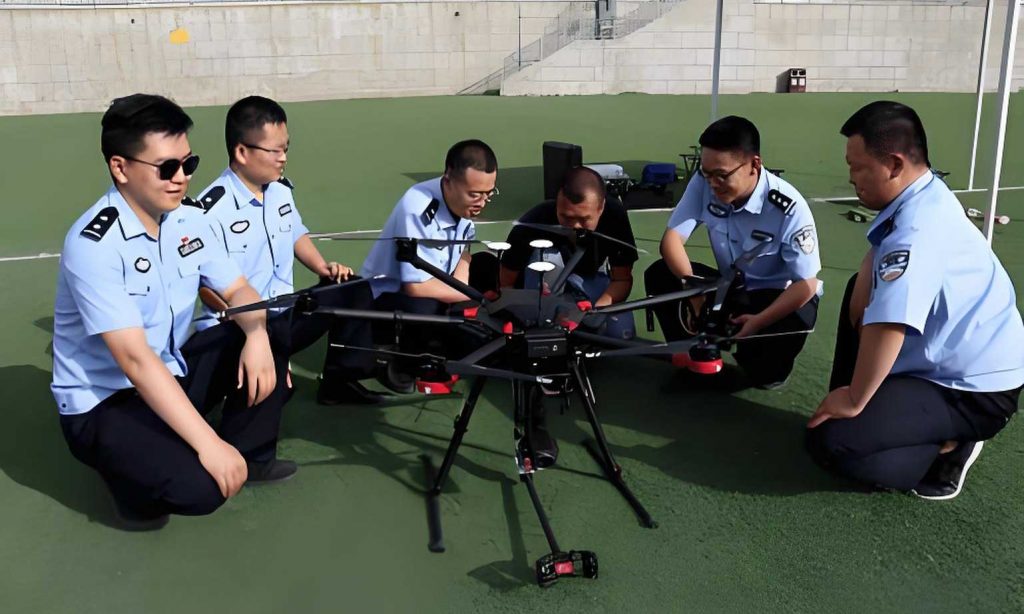
A dedicated hardware suite was developed to maximize trainee immersion and realism, which is essential for effective drone training. This platform provides an interactive learning and skill-development experience.
| Hardware Component | Function in Drone Training |
|---|---|
| Main Host Computer | Runs the core simulation software, stores the training management database, and executes the physics engine. |
| Control Console & Display | Provides the primary instructor interface and visual output for observers. It connects to the host to render the virtual environment matching the inspection scenario. |
| Virtual Reality (VR) Headset | Worn by the trainee to provide a first-person, stereoscopic 3D view of the virtual inspection environment, creating a deep sense of presence. |
| Simulated Transmitter/Controller | A physical replica of an actual drone remote controller. Trainees use it to send flight commands, mimicking real control stick inputs. |
| Flight Control (FC) Module | Typically a Pixhawk or similar hardware. It parses commands from the simulated transmitter and converts them into realistic flight parameter data for the simulation. |
| Personnel Positioning Module | Tracks the trainee’s physical position in the training space and maps it to their virtual location, ensuring correct spatial orientation and movement within the simulation. |
The operational flow is as follows: The host computer loads the virtual model from the database. The trainee, wearing the VR headset, follows on-screen or auditory instructions. Using the simulated transmitter, they generate control inputs. The FC module parses these inputs and sends the data to the host. The host’s physics engine calculates the new state of the virtual drone, and the updated scene is rendered on the display and inside the VR headset. The positioning module constantly aligns the trainee’s real-world position with the virtual space. This integrated loop allows the trainee to complete all steps of a standardized drone inspection operation within a fully virtual yet physically responsive environment.
2.3 System Software Platform
2.3.1 Software Support Platform
The development leveraged a suite of industry-standard tools chosen for their specific strengths in creating an immersive drone training simulation.
| Attribute | Support Platform / Technology |
|---|---|
| System Architecture | Hybrid C/S and P2P Model |
| Operating Environment | Microsoft Windows Series |
| Database | Microsoft SQL Server |
| Development Framework | .NET Framework |
| Core Programming Language | C++ (for low-level physics/network modules) |
| 3D Modeling & Animation | 3DMax, Maya, Zbrush, Photoshop |
| Virtual Reality Engine | Unity3D |
The development process followed an iterative and parallel model to accelerate progress. Key stages included requirement analysis, 3D asset creation, scene integration in Unity3D, development of core simulation logic and network modules in C++, and rigorous integration testing.
2.3.2 Model and Scene Design
The fidelity of the virtual environment is paramount for effective drone training. The design pipeline for 3D assets and scenes was meticulous:
- Requirements Definition: Based on specific inspection projects (e.g., insulator inspection on a 500kV lattice tower).
- Field Data Capture: Photographing target equipment and environments from multiple angles.
- 3D Modeling: Using 3DMax or Maya to create precise geometric models of drones, towers, insulators, and other hardware based on photos and technical drawings.
- Texture Creation: Using Photoshop to create high-resolution, realistic surface textures (colors, rust, wear) from the field photographs.
- Character Detailing: Using Zbrush for high-detail sculpting of human operator models if needed for procedural training.
- Export and Integration: Models are exported to a format compatible with Unity3D (e.g., FBX). Within Unity, these assets are assembled, lit, and rendered to construct a physically accurate and visually convincing transmission line corridor environment.
Scene construction is data-driven. A main program information script handles initialization, while separate, user-configurable scene construction script files define the placement and properties of all objects (towers, terrain, vegetation) for different drone training scenarios.
2.3.3 Hardware-in-the-Loop (HIL) Simulation with AirSim and Pixhawk
A cornerstone of this system is its high-fidelity flight dynamics simulation, achieved through a hardware-in-the-loop setup using AirSim and a Pixhawk flight controller. This approach bridges the gap between pure software simulation and real hardware, providing an unparalleled sense of realism in drone training.
A) Flight Physics Simulation with AirSim: The system is built upon Microsoft’s open-source AirSim simulator, which is itself a plugin for Unreal Engine. AirSim provides a highly realistic physics engine for vehicles, including multirotor drones. It simulates aerodynamic forces, motor dynamics, battery discharge, and environmental factors like wind and turbulence. For drone training, we created a detailed virtual replica of a power transmission corridor within AirSim. The flight dynamics of the virtual drone are governed by accurate physics, and its state is updated in real-time based on control inputs. The control logic can be described as a function of forces and moments:
$$ \begin{bmatrix} \dot{u} \\ \dot{v} \\ \dot{w} \end{bmatrix} = \frac{1}{m} \begin{bmatrix} X \\ Y \\ Z \end{bmatrix} – \begin{bmatrix} 0 \\ 0 \\ g \end{bmatrix} – \begin{bmatrix} qw – rv \\ ru – pw \\ pv – qu \end{bmatrix} $$
Where \( [u, v, w] \) are linear velocities, \( [p, q, r] \) are angular rates, \( [X, Y, Z] \) are total external forces (thrust, drag), \( m \) is mass, and \( g \) is gravity. AirSim solves these equations in real-time, providing a true-to-life flight model for drone training.
B) Control Interface via Pixhawk: To translate physical user input into the simulation, a real Pixhawk flight controller is used. The Pixhawk, featuring an STM32F427 processor and a suite of sensors, runs the PX4 or ArduPilot open-source firmware. In our HIL setup:
- The trainee operates a physical radio transmitter.
- The transmitter’s signals are received by a radio receiver connected to the Pixhawk.
- The Pixhawk firmware processes these inputs as if it were flying a real drone, generating corresponding actuator output signals (e.g., for motor speed).
- These output signals are captured by a companion computer (the main host) via a serial connection.
- The host software translates these actuator commands into control inputs for the AirSim drone model.
- AirSim computes the new drone state, and the video feed is sent to the VR headset and display.
This loop means the trainee is literally “flying” a Pixhawk, which is controlling a virtual drone with realistic physics. This provides authentic muscle memory development and response training, covering various common drone platforms (quadcopters, hexacopters, octocopters) and flight modes (GPS, Attitude).
2.3.4 Database Design
The simulation training system relies on a structured relational database (MySQL) to manage critical data entities essential for personalized and trackable drone training. The primary tables include:
- User_Info: Stores trainee profiles, credentials, and training history.
- ExamQuestion_Info: Houses the question bank for theoretical assessments, linked to specific drone training modules.
- EXEINFO (External Execution Info): Manages metadata for external files, such as 3D model paths, document links, and tutorial videos. Instead of storing large files in the database, this table records their file system paths for efficient retrieval.
- Model Database Tables: Separate tables catalog the available 3D assets (drones, towers, components), their properties, and file paths for the Unity3D engine to load on demand.
This design ensures efficient data management, quick querying for training content, and detailed logging of trainee performance.
3. System Application Case Study
3.1 Case Implementation and Interface
The user interface (UI) is the primary conduit for human-system interaction during drone training. It guides the trainee, provides feedback, and structures the learning journey. The main interface features clear functional buttons for system configuration: Basic Training, Weather Selection, Scene Selection, Drone Model Selection, and Control Mode. Through these, the trainee defines their training mission—such as foundational flight practice, detailed inspection, or emergency response drill.
3.1.1 Foundational Skill Training
This module is designed to build core piloting competency, structured to meet both generic (AOPA) and industry-specific certification requirements for drone training.
| Training Tier | Supported Maneuvers & Modes | Training Objective |
|---|---|---|
| AOPA Certification Prep | Take-off/Landing, Stationary Hover, 360° Rotation, Figure-8 Flight Pattern. | Mastery of basic flight skills required for pilot licensing. |
| Basic Drone Control | GPS/Attitude Mode Flight; Multi-level Hovering; Horizontal Movement; 45° and 90° Orientation Hovers. | Developing precise control and spatial awareness in different flight modes. |
| Advanced Drone Control | Orbiting (with nose-in/out); Free Flight; Long-Range Return-to-Home; Figure-8 with fixed orientation; First-Person View (FPV) Flying. | Building advanced skills for complex navigation and mission execution in inspection contexts. |
The training interface provides a virtual flying field with visual guidance and metrics. The assessment interface objectively scores performance on parameters like positional accuracy (\( \Delta_{pos} = \sqrt{(x_t – x_g)^2 + (y_t – y_g)^2} \)), stability, and completion time, providing quantifiable feedback for this stage of drone training.
3.1.2 Detailed Inspection Operation Simulation
Moving beyond basic flight, this module simulates real-world inspection tasks. Based on the specific grid characteristics of the Wenzhou area, highly detailed 3D models were created:
- Asset Models: Towers (straight, strain, multi-circuit), insulators, and fittings were modeled to exact proportions and appearance.
- Terrain & Environment: Using real geospatial data, a 5km segment of a 500kV transmission line corridor was reconstructed, including authentic terrain, vegetation, and atmospheric conditions.
- Standardized Procedure Integration: The virtual environment is populated with interactive waypoints and checkpoints. The trainee must navigate the drone along a predefined inspection path. The system prompts the trainee to approach specific components (e.g., “Inspect Insulator String on Tower #12”). Upon reaching the correct vantage point, the interface allows the trainee to simulate capturing a still image or a thermal scan. The system logs the position, angle, and “captured” data, teaching proper inspection standoff distances, camera angles, and systematic coverage—a critical aspect of professional drone training.
3.1.3 Emergency Response and Failure Training
A unique and vital component of this drone training system is the ability to safely simulate in-flight failures. Trainees can select from a menu of emergency scenarios within a dedicated training module:
- Signal Interference/Loss: Simulates degraded or lost control link, training Return-to-Home (RTH) protocol activation and manual reorientation.
- Motor/Power Failure: Simulates the sudden loss of one or more motors, training for emergency landing procedures and attitude control under asymmetric thrust.
- Unsafe Landing Zone: Presents take-off or landing scenarios on uneven or obstructed terrain.
The simulation injects these faults dynamically. For example, a motor failure can be modeled by instantly altering the thrust vector \( \vec{T} \) for the affected rotor to zero or a reduced value in the physics engine:
$$ \vec{T}_{\text{effective}} = \sum_{i=1}^{n} \vec{T}_i \cdot \delta_i, \quad \text{where } \delta_i \in \{0, k\} \text{ for failure simulation}. $$
The trainee must diagnose the issue from the drone’s behavior and instrument feedback and execute the correct recovery procedure, building critical muscle memory and decision-making skills without any risk to personnel or equipment.
3.2 Interactive Operation and System Deployment
The fully deployed system integrates all hardware components into a functional training station. A typical setup includes one control console, multiple displays for instruction and observation, a VR headset, a simulated transmitter, and the necessary networking equipment. Trainees can operate individually or assume different roles (pilot, visual observer, data analyst) within a team-based drone training exercise. This setup enables multi-user, cross-regional collaborative training sessions. The fusion of visual, auditory, and simulated haptic feedback within a three-dimensional training space comprehensively enhances the learning, cognitive understanding, and practical skill development outcomes of the drone training program.
4. Conclusion
This article has detailed the design and development of a Networked Drone Inspection Operation Simulation Training Interactive System. The platform implements a “theory-interaction-feedback” pedagogical model for comprehensive power grid drone training. First, it integrates standardized inspection methodologies into a structured digital curriculum with integrated assessment. Second, and more innovatively, it employs a hardware-in-the-loop immersive environment with VR and real flight controllers for interactive operational simulation. This allows trainees to thoroughly practice procedures, identify weaknesses, and internalize emergency protocols, thereby mastering standardized inspection skills.
The system’s architecture—combining robust C/S management with collaborative P2P features, high-fidelity physics simulation via AirSim, and realistic control through Pixhawk HIL—represents a significant advancement in simulation-based drone training. The applied case study demonstrates its effectiveness in delivering foundational flight training, detailed procedural inspection practice, and critical emergency response drills. By providing a safe, scalable, and realistic training environment, this system holds excellent promise for improving the proficiency, safety, and efficiency of drone inspection teams within the power industry and beyond. It establishes a novel and reliable paradigm for advanced, interactive drone training.